Internal Transfer only available to:
- Position transferred to another linked ZacksTrade account with matching Account Name, Account Title and Tax ID.
Complete the following steps:
1. Log in to Client Portal and click on the Transfer & Pay > Transfer Positions.
2. In the Transaction Type list, select Internal Transfer.
3. In the Method list is automatically set to Position Transfer.

4. The Transaction Information section shows the available destination account (the account to which you want to transfer assets) and all available assets in the source account.
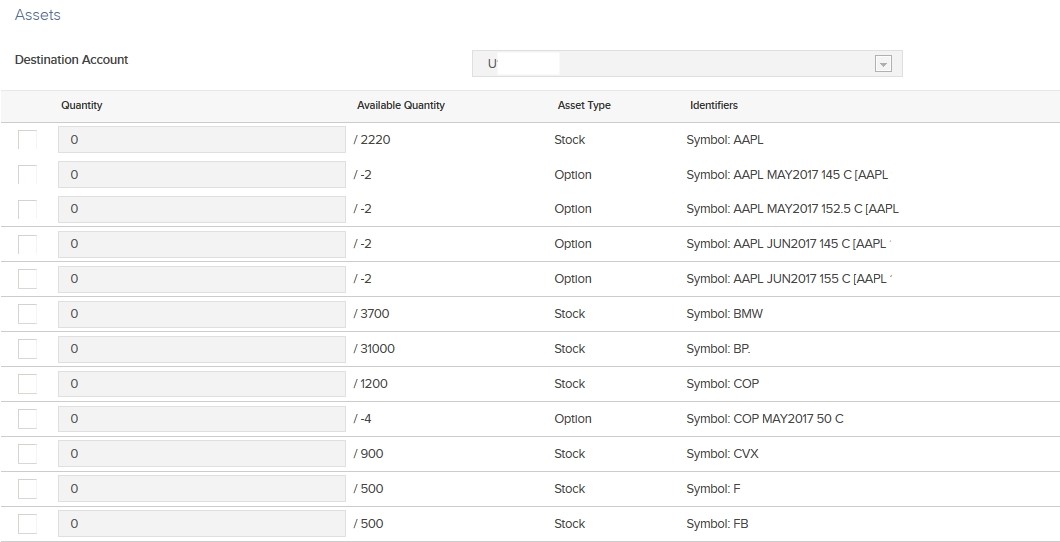
5. Select assets to transfer by clicking the box on the left side of an asset row, then entering the number of shares or contracts to transfer in the Quantity field.
6. If prompted on the next screen, verify your identity and enter the confirmation number we emailed to you.
7. Click Continue.